Reviving a ten-year-old website
How I used Docker to bring my 10-year-old website back from the dead
Recently, I came across the source code for one of my old websites, Mine the Cyril. This was a website with news, accounts, forums, and even livestream listings: basically, anything I (and some templates) could make.
I decided to try to run it again, for nostalgia’s sake (and to see how cringe it was).
However, I wanted to keep modifications to a minimum, if not straight up not doing any, and doing that meant running old software.
Let’s get started
I soon came across multiple problems when trying to revive it:
- The site was made with PHP 5 and the since-removed
mysqlextension - I don’t have any backups of the MySQL database (I
wasam dumb)
Let’s see how I managed to fix both issues, starting with the first.
Running old software
PHP has come a long way over the last ten years. We’ve gone from version 5 to version 8, each version changing the language a lot, and who could forget PHP 6?
Today, however, we’re stuck in the past. And back in 2014/2015, this meant PHP version 5. So let’s see how we can get PHP 5 working these days.
Docker to the rescue?
So, I need a ten-year-old version of PHP and a web server. My first thought was a simple one:
I know, I can get that from Docker Hub!
And that’s what I did. There’s a variant of the php image with Apache web server built in, with the tags apache. For PHP 5, the image to use is then php:5-apache.
So I opened the source code in my current editor, Visual Studio Code, as opposed to my then-editor, Microsoft WebMatrix (remember ?), and created a Dockerfile and docker-compose.yml file.
Here are the contents of the Dockerfile:
FROM php:5-apache
RUN apt-get update && apt-get install -y \
  libfreetype6-dev \
  libjpeg62-turbo-dev \
  libpng-dev \
  && docker-php-ext-configure gd --with-freetype --with-jpeg \
  && docker-php-ext-install -j$(nproc) gd \
  && docker-php-ext-install -j$(nproc) mysql
COPY ./ /var/www/html/
RUN mv "$PHP_INI_DIR/php.ini-production" "$PHP_INI_DIR/php.ini"
This Dockerfile is based on the PHP 5 with Apache web server Docker image, updates and installs additional packages needed for the GD image manipulation extension, installs and enables said extension, as well as the mysql extension.
And here are the contents of the Docker compose file:
services:
  adminer:
    image: adminer
    restart: always
    depends_on:
      - db
    ports:
      - 8080:8080
  web:
    build:
      context: .
      dockerfile: Dockerfile
    restart: always
    depends_on:
      - db
    ports:
      - 80:80
  db:
    image: mysql:5.7
    restart: always
    environment:
      MYSQL_DATABASE: flfg1bqk
      MYSQL_USER: flfg1bqk
      MYSQL_PASSWORD: <redacted>
      MYSQL_RANDOM_ROOT_PASSWORD: "1"
    volumes:
      - db:/var/lib/mysql
volumes:
  db:
This compose file includes Adminer to manage the database, a MySQL 5.7 database, and a main web service that will run our code, built using the above Dockerfile.
Let’s ship it!
Now that I have a Dockerfile and Docker compose file that should work (spoiler: it won’t), I “composed it up” and waited.
However, a problem occurred when building the Docker image, specifically in step 2, which installs additional packages for gd, the image manipulation PHP extension.
Err:9 http://deb.debian.org/debian stretch/main amd64 Packages
  404  Not Found
Ign:10 http://deb.debian.org/debian stretch/main all Packages
Ign:11 http://deb.debian.org/debian stretch-updates/main all Packages
Err:12 http://deb.debian.org/debian stretch-updates/main amd64 Packages
  404  Not Found
Reading package lists...
W: The repository 'http://security.debian.org/debian-security stretch/updates Release' does not have a Release file.
W: The repository 'http://deb.debian.org/debian stretch Release' does not have a Release file.
W: The repository 'http://deb.debian.org/debian stretch-updates Release' does not have a Release file.
E: Failed to fetch http://security.debian.org/debian-security/dists/stretch/updates/main/binary-amd64/Packages  404  Not Found [IP: 151.101.130.132 80]
E: Failed to fetch http://deb.debian.org/debian/dists/stretch/main/binary-amd64/Packages  404  Not Found
E: Failed to fetch http://deb.debian.org/debian/dists/stretch-updates/main/binary-amd64/Packages  404  Not Found
E: Some index files failed to download. They have been ignored, or old ones used instead.
As we can see, it tries to load from deb.debian.org. The problem is, it gets a 404. Going there with a browser, and browsing all the available files, no stretch directory. It’s like, gone.
Turns out the php:5-apache image is based on Debian 9, aka Debian Stretch, hence why it’s loading the packages for stretch. But why are the packages not available?
A little later, I realised that Debian 9 is not supported anymore, it’s end of life. But unlike what I thought, when a version of Debian becomes end-of-life, its repositories are eventually deleted.
Why, Debian, why?
It turns out the Debian repositories for older versions regularly get archived under archive.debian.org, and you need to change your /etc/apt/sources.list to reflect the change, or else you get an error when trying to update or install packages.
Debian actually publishes several Docker images for end-of-life Debian versions, so I downloaded and ran the debian/eol:stretch image to see what’s inside the sources.list file:
# deb http://snapshot.debian.org/archive/debian-archive/20240331T102506Z/debian stretch main
deb http://archive.debian.org/debian stretch main
# deb http://snapshot.debian.org/archive/debian-archive/20240331T102506Z/debian-security stretch/updates main
deb http://archive.debian.org/debian-security stretch/updates main
So it looks like we need to replace deb.debian.org with archive.debian.org and we should be fine, in theory.
Easy fix, in the end
Okay, let’s just override the sources.list file from the php:5-apache image with the one from debian/eol:stretch, by manually copying a modified sources.list using the COPY instruction, to have the following file at the end:
FROM php:5-apache
COPY sources.list /etc/apt/sources.list
RUN apt-get update && apt-get install -y \
  libfreetype6-dev \
  libjpeg62-turbo-dev \
  libpng-dev \
  && docker-php-ext-configure gd --with-freetype --with-jpeg \
  && docker-php-ext-install -j$(nproc) gd \
  && docker-php-ext-install -j$(nproc) mysql
COPY ./ /var/www/html/
RUN rm /var/www/html/comptes/.htaccess
RUN rm /var/www/html/lives/.htaccess
RUN mv "$PHP_INI_DIR/php.ini-production" "$PHP_INI_DIR/php.ini"
And it builds! Well, it does build on two out of three of my machines, for some reason, my old Ubuntu laptop complains about some “Compiler not working” error. Anyways.
Holding on to your data
Now that we have a working web service, let’s take a look at the database. Database for which we don’t have any data or structure, may I remind you?
We need more data
As you can imagine, I won’t be able to bring back the actual data from the database. I (foolishly) didn’t keep any backups, and Olympe, my free hosting provider of the time, has been dead for a decade now. What I can do is try to re-create the structure of the database and put some sample data in it.
So that’s what I did, by running the site, seeing what breaks, and creating tables with columns the site was expecting. I also looked at the source code to help me. In my quest, I was helped by two SQL files I found lying in the source code, which got me a lot of the way there.
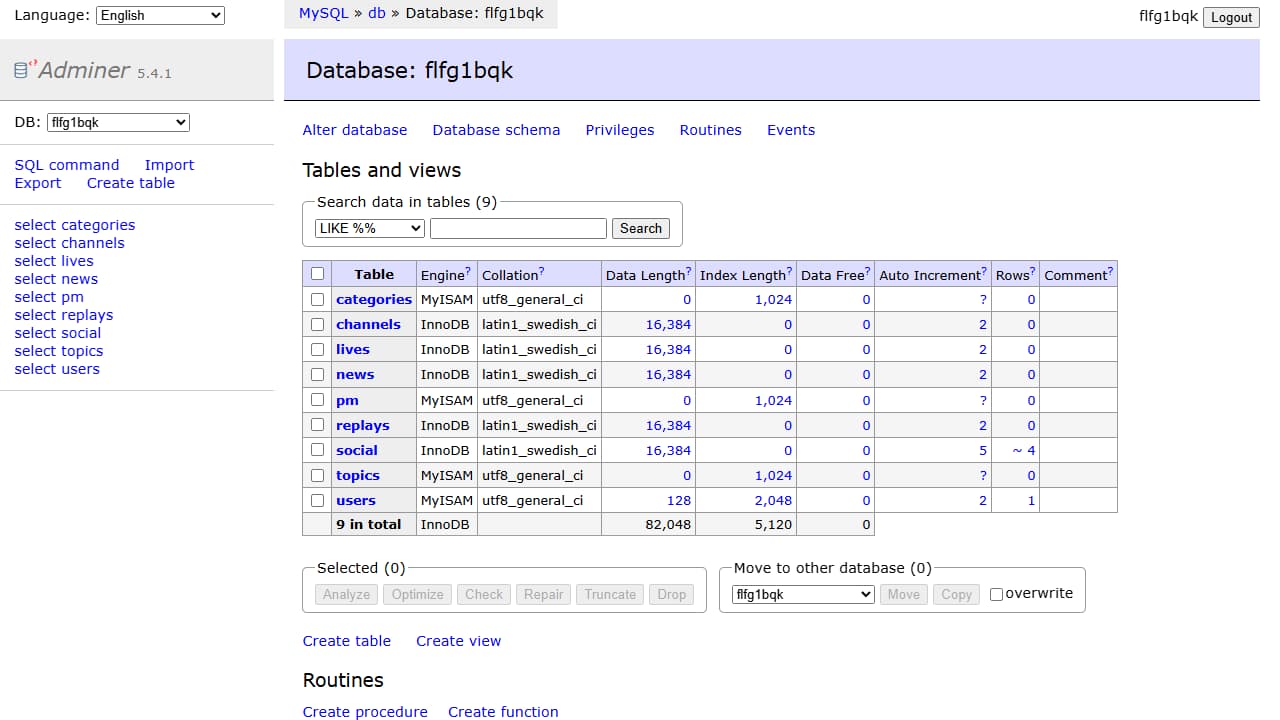
I exported it all into one SQL file and had it copied to the database service using a volume like so:
db:
  image: mysql:5.7
  restart: always
  environment:
    MYSQL_DATABASE: flfg1bqk
    MYSQL_USER: flfg1bqk
    MYSQL_PASSWORD: <redacted>
    MYSQL_RANDOM_ROOT_PASSWORD: "1"
  volumes:
    - ./database.sql:/docker-entrypoint-initdb.d/database.sql:ro
    - db:/var/lib/mysql
Data-based connection
Last step before the web service could access the database: have a DNS alias for it. That’s because the source code has hard-coded sql.olympe.in as the hostname for the database, so I needed a way to tell Docker to point that to the database service.
I tried multiple ways, creating a custom network and manually assigning IP addresses, using aliases, but in the end, it was as simple as adding a link to the web service:
web:
  build:
    context: .
    dockerfile: Dockerfile
  restart: always
  depends_on:
    - db
  ports:
    - 80:80
  links:
    - db:sql.olympe.in
The final files
Here are the final Dockerfile and docker-compose.yml, if you’re interested:
FROM php:5-apache
COPY sources.list /etc/apt/sources.list
RUN apt-get update && apt-get install -y \
  libfreetype6-dev \
  libjpeg62-turbo-dev \
  libpng-dev \
  && docker-php-ext-configure gd --with-freetype --with-jpeg \
  && docker-php-ext-install -j$(nproc) gd \
  && docker-php-ext-install -j$(nproc) mysql
COPY ./ /var/www/html/
RUN mv "$PHP_INI_DIR/php.ini-production" "$PHP_INI_DIR/php.ini"
services:
  adminer:
    image: adminer
    restart: always
    depends_on:
      - db
    ports:
      - 8080:8080
  web:
    build:
      context: .
      dockerfile: Dockerfile
    restart: always
    depends_on:
      - db
    ports:
      - 80:80
    links:
      - db:sql.olympe.in
  db:
    image: mysql:5.7
    restart: always
    environment:
      MYSQL_DATABASE: flfg1bqk
      MYSQL_USER: flfg1bqk
      MYSQL_PASSWORD: <redacted>
      MYSQL_RANDOM_ROOT_PASSWORD: "1"
    volumes:
      - ./database.sql:/docker-entrypoint-initdb.d/database.sql:ro
      - db:/var/lib/mysql
volumes:
  db:
So, how bad is it?
So now that I’ve got it working, how much does it suck? Well, after browsing the site and looking at the source code, you can definitely see that I was learning programming.
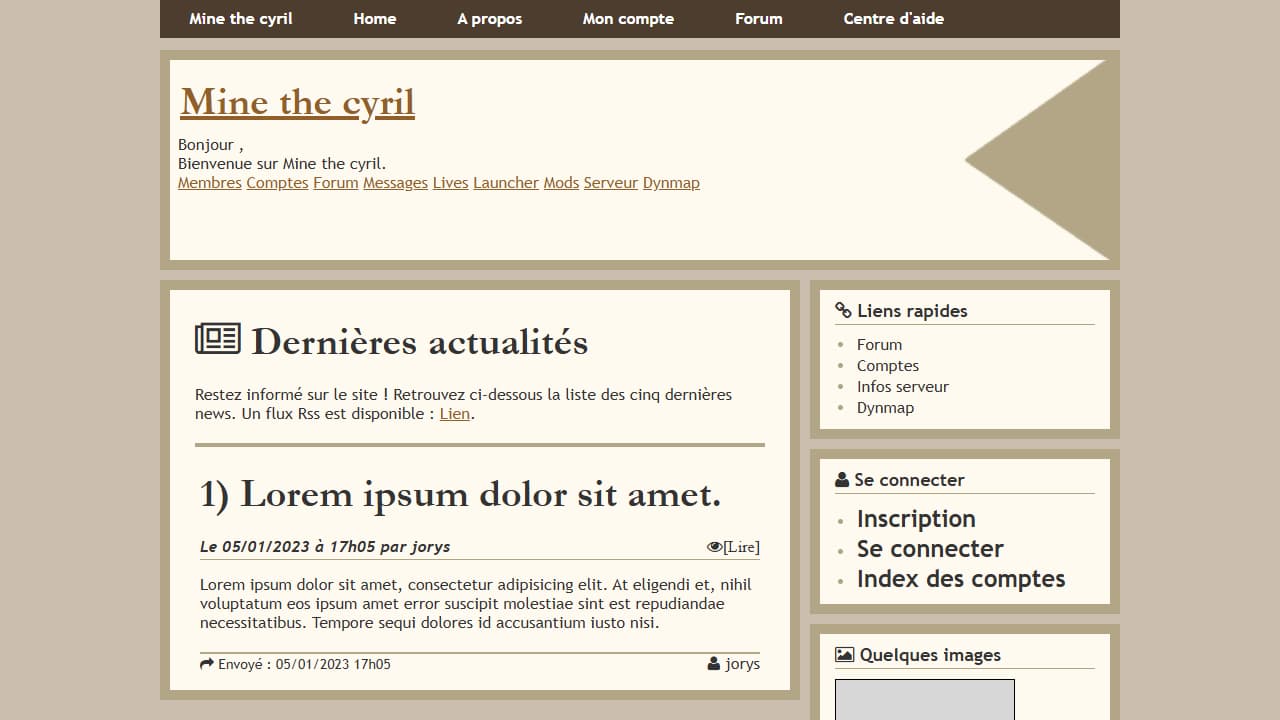
Doing it all over again today, I’d probably do a lot of things differently. But that doesn’t matter; at least I still got it working ten years later, and hopefully for a while longer.
Thanks for reading!